What Kuse is
Kuse is an AI visualization workbench that integrates AI intelligent assistant, unlimited canvas and information integration functions, just like ChatGPT + Whiteboard+ Notion The “combination” can think about work from a human perspective. Users can drag text, pictures, links and other materials to the canvas, freely arrange and combine them, and build a clear knowledge structure. Kuse’s built-in AI assistant can polish text, summarize key points, inspire inspiration, and support real-time collaboration between multiple people to make team communication smoother. Kuse multimedia support function makes knowledge presentation richer and more vivid. Kuse can transform chaotic information into organized smart output to help efficient work and study.

Kuse’s main features
- Infinity Canvas : Provide a borderless workspace where users can freely drag, arrange and combine information to build a personalized knowledge structure.
- AI smart assistant : Built-in powerful AI function supports polishing text, summarizing content, extracting key information, and generating ideas and suggestions based on user needs.
- Multimedia integration : Supports content in multiple formats, including text, pictures, PDFs, videos, web links, etc., making it easy for users to integrate information from different sources.
- Real-time collaboration : Supports multiple people working on one canvas at the same time, suitable for teamwork, improving communication efficiency and creative output.
- Information structured : Help users organize messy information into a clear structure for easy understanding and memory.
- Reuse : The knowledge structure created by the user can be saved as a template, which is convenient for reuse and can quickly build a new knowledge system.
- Save & Export : Content is automatically saved to the cloud, supports cross-device access, supports export to PDF, picture or text format for easy sharing and archiving.
How to use Kuse
- Registration & Login : Visit Kuse official website https://app.kuse.ai/,用邮箱或 Google account to register and log in.
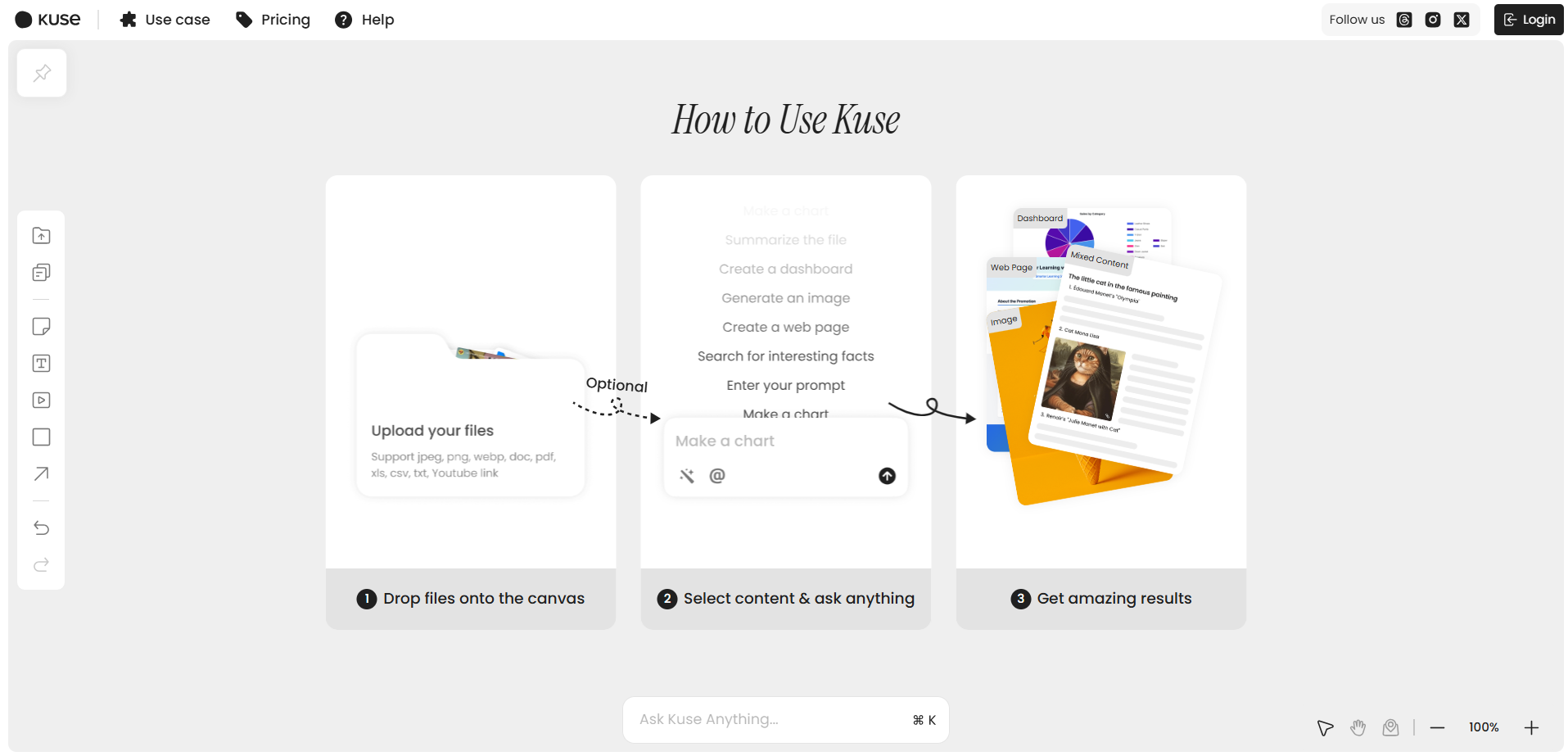
- Create canvas : Click “New Project” to create a new canvas, name it to distinguish different projects.
- Importing Profile : Upload text, pictures, PDFs, videos or web links on canvas.
- Visual Edit : Drag, arrange and connect information blocks to build a personalized knowledge structure.
- Exploiting AI capabilities : Enter instructions in the chat box, such as “polishing text” or “summarizing content”, and the AI will respond instantly and optimize the information.
- Building a knowledge map : Organize information, add notes, adjust layout, and form a clear knowledge map.
- Save & Share : The content is automatically saved to the cloud and can be exported to PDF, picture or text format for easy sharing.

Kuse application scenarios
- Project management : Visualize project tasks, resources and progress on canvas, and team members collaborate to update in real time to improve management efficiency.
- Idea : Designers organize design inspiration and competitive product analysis on canvas, and AI provides style suggestions to inspire more creativity.
- Academic research : Researchers integrate literature, video and experimental data, and AI generates structured notes to help efficient research.
- EDUCATIONAL LEARNING : Teachers produce interactive courseware, students organize reading notes, AI assists in polishing and summarizing, and optimizes teaching and learning.
- Marketing : The team collects market trends and competitive product information, and AI generates marketing copywriting and action plans to improve marketing effects.