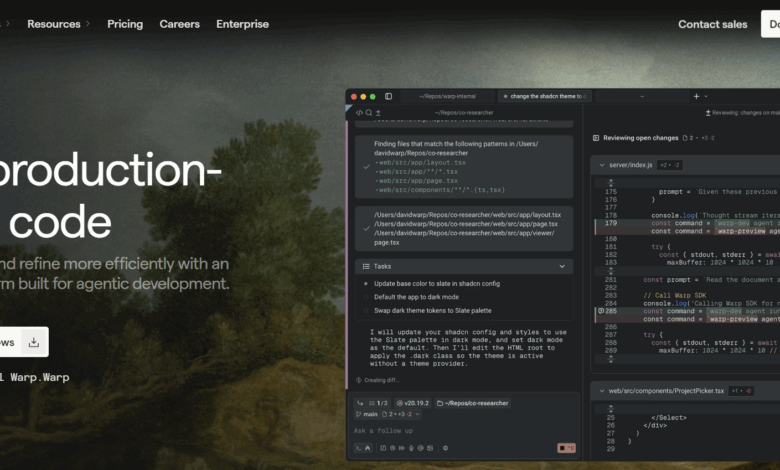
What is Warp Code
Warp Code is the latest from the Warp team AI programming tools , build a complete AI-assisted programming closed loop from Prompt to production environment, with top-level coding agents, code review, code editing and project management functions, allowing developers to efficiently complete the process from writing Prompt to code generation, review, and modification within Warp The entire process until release has significantly improved development efficiency and code quality, making Warp move from a modern terminal to a complete one AI IDE An important step in the transformation.
Main features of Warp Code
- Top-level coding Agent : #1 in Terminal-bench and #3 in SWE-bench Verified (based on GPT-5 ), providing high-quality code generation.
- Code review : Provides a dedicated panel in Warp that supports viewing Agent-generated changes and line-level editing diffs. It can be operated directly in Warp without jumping to external tools such as GitHub.
- Code editing : Supports opening and editing files directly in Warp, and has features such as tabbed file view, syntax highlighting, file tree, vim key, etc., which facilitates small-scale modification of code generated by Agent.
- Warp Project Support :compatible with Agents.MD, Claude.MD, via WARP.md file Cursor Rules, support for defining agent configuration files and global slash commands, optimizing the agent boot experience.

How to use Warp Code
- Install Warp : Visit Warp Code official website https://www.warp.dev/code, download Warp client.
- Start Warp : Open the Warp terminal and enter the main interface.
- Create or open a project : In Warp’s welcome interface, select Create a new project or open an existing project.
- Writing Prompt : In the main interface of Warp, enter Prompt, for example “fix this vulnerability” or “add this feature”. Warp’s Agent generates code based on Prompt.
- Code review : View Agent-generated changes to modify code directly through line-level editing functionality.
- Code editing : Open and edit files directly within Warp, supports tabbed file view, syntax highlighting, file tree and vim key binding.
- Use global Slash commands : Warp provides global Slash commands such as/init,/add-rule,/add-server, etc. Can help users quickly add global rules, MCP servers and execute saved Prompt.
- Project management : Manage project rules and configuration with WARP.md file. Define different Agent profiles to launch different types of Agents depending on task requirements.
- Submit code : After completing code review and editing in Warp, you can submit code directly to the version control system (such as Git).
Warp Code application scenarios
- Quick fix for vulnerabilities : When a vulnerability is discovered during development, developers can directly review, edit and submit it within Warp, effectively shortening the repair time.
- New features development : When you need to add new functions to a project, enter the Prompt of the function description into Warp, the Agent quickly generates the corresponding code, and the developer reviews and modifies it within Warp, reducing manual coding workload.
- Code review : During team development, developers can view code changes generated by the Agent in Warp and modify them with line-level editing functions without switching tools.
- Project initialization : When starting a new project, you can quickly build the project structure and configuration to prepare for development.
- Learning and teaching : Developers or students can learn and modify code within Warp, and quickly get started with new languages or frameworks by generating code.