What is the translation of “D-Design AI pictures?”
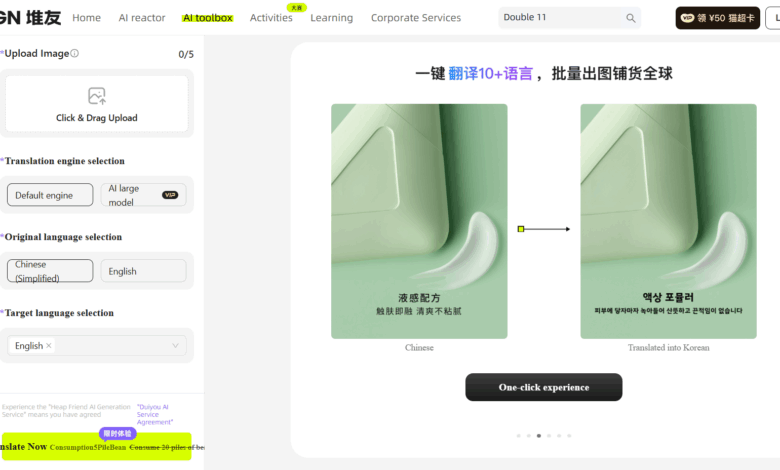
D-Design AI picture translation is launched by D-Design AI Smart translation tools , can automatically recognize and translate text content in pictures. Users only need to upload pictures, select the original text and target language, and AI can quickly complete the translation. D-Design AI image translation is especially suitable for e-commerce, advertising design and multi-language content creators, helping users easily overcome language barriers and improve work efficiency. D-Design AI picture translation supports editing and optimization of pictures, and the translated content is more beautiful and professional.
The main function of heap friend AI picture translation
- Automatic text recognition : Automatically recognize text in pictures and extract it.
- Multilingual translation : Support translation into multiple target languages such as Traditional Chinese, English, Korean, Portuguese, Spanish, French, Japanese and Russian.
- Translation engine selection : Users can choose to use the default engine or AI large model for translation to adapt to different translation needs and quality requirements.
- Image Edit : Supports editing pictures, such as adding text, resizing, cropping, etc.
- Partial untranslated : The user can select a specific area in the picture without translation.
- One-click generation : Users can quickly generate translated pictures and improve work efficiency.
How to use Heap Friend AI Picture Translation
- Visit Official Website : Visit the official website of D-Design AI Picture Translation https://d.design/toolbox/translate , register and log in to your account.
- Upload Image : Click the upload button, select the picture file you want to translate, or drag the picture directly to the specified area.
- Select Translation Engine : Select the translation engine as needed, select the default engine or AI large model.
- Select language : Choose the language of the original and the target language you wish to translate into.
- Start translation : Click to start translation, AI will automatically process the picture and translate the text.
- Editing and proofreading : After the translation is completed, check the translation results. If necessary, edit the translated text, such as adjusting font, size, color, etc.
- Save or Download : After confirming that the translation is correct, save the editing results or download the translated picture directly.

Application scenarios of AI image translation for pile friends
- Cross-border e-commerce : Translate the text on the product picture into the language of the target market, so that consumers in different languages can understand the picture content.
- Advertising and marketing : Translate the text on advertising pictures to adapt to the markets of different countries and regions.
- Tourism and hospitality : Translate tourism promotional materials, maps, signs, etc. to facilitate international tourists.
- Education and academics : Translate charts and pictures from textbooks and academic articles for use by students and researchers from different language backgrounds.
- Social Media and Content Creation : Translate image content on social media to expand the audience of your content.