Vision Factory – AI creation tool that supports AI image and video generation services

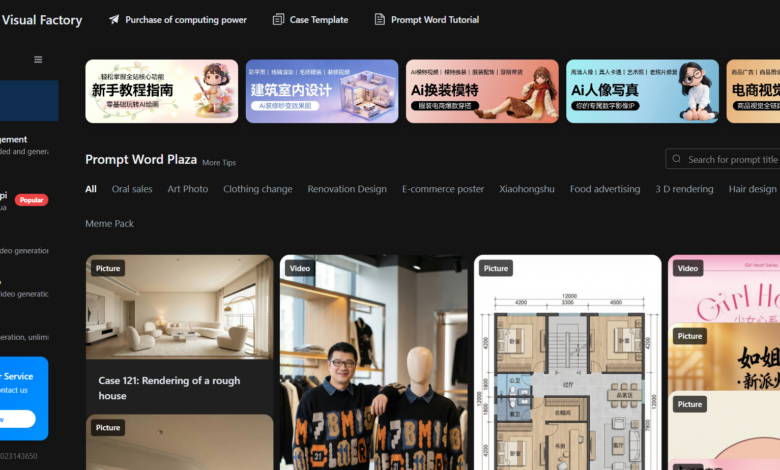
What is the visual factory
Vision Factory is an online AI creation tool that supports AI-generated images and video generation services. Package the top raw images and video large models into “idiot buttons”, which can also be easily used by non-professional users. Nano Banana Pro The large model supports extremely fast image output. Users can generate 4K commercial images by inputting one sentence. It has functions such as local redrawing, one-click imitation of images, lossless character modification, and model costume change. In terms of video generation, the visual factory aggregates Sora, Veo, Grok, Tongyi Wanxiang and other models support multiple functions such as text-generated videos, image-generated videos, and video substitutions, and can quickly generate professional prompt words through the video reverse thrust function.
Main functions of the visual factory
-
Professional student pictures : Connect to the Banana Pro large model and generate 4K commercial images by inputting one sentence. It supports functions such as local redrawing, one-click imitation of images, lossless font modification, and model costume change.
-
Video generation : Aggregates top video models such as Sora, Veo, Grok, and Tongyi Vientiane, supports functions such as text-generated video, image-generated video, video substitutions, and image-generated actions, and also provides batch queues and automatic reruns of failures.
-
Video Re-tweet :Upload a video link or local video, and the system disassembles the lens, tone, and rhythm in seconds to generate professional prompt words to help quickly reproduce the hit product.
-
One click to form a piece : Input product images and short selling points, AI automatically writes storyboards, adds subtitles, and applies special effects to generate commercial advertisements, which are suitable for quickly producing marketing videos.
-
Professional Tips Thesaurus : It has a large number of verified industry templates built in, covering e-commerce, construction, beauty and other scenarios. Users can apply them with one click to quickly generate high-quality content.
How to use Visual Factory
-
Register Login :Visit the Visual Factory official website https://d.aijuh.com/
-
Select a function module : Select functions such as image generation, video generation, video reverse push or one-click film generation according to your needs.
-
Input requirements : Enter a text description in the corresponding module and upload an image or video material. For example, enter a one-sentence description when generating an image, and upload a script or image when generating a video.
-
Adjust parameters : Select a model (such as Banana Pro, Sora, etc.) and adjust parameters (such as resolution, style, viewing angle, etc.) to optimize the generation effect.
-
Generate content : Click the generate button and wait for the system to process. After generating the results, you can preview, download or further edit them.
-
Preservation and management : The generated images and videos can be viewed, downloaded or shared in asset management for easy subsequent use.
Core advantages of the visual factory
-
Efficient generation : Access top-level image and video generation models, input simple descriptions to quickly generate high-quality images and videos, and greatly shorten the creation cycle.
-
Multi-model integration : Aggregates multiple models such as Banana Pro, Sora, Veo, and Grok to support multiple generation needs, such as text-generated videos, image-generated videos, video substitutions, etc., to meet diverse creative scenarios.
-
Intelligent reverse thrust function : Through the video reverse push function, upload the popular video link or local video, and the system disassembles it in seconds to generate professional prompt words, helping users quickly reproduce the same popular model.
-
One click to form a piece : It only requires a product image and a short selling point. AI automatically completes the production of storyboards, subtitles, special effects, etc., and exports commercial advertisements with one click, making it suitable for quickly producing marketing content.
-
Massive templates : Built-in massive professional prompt vocabulary and industry templates, covering high-frequency scenarios such as e-commerce, architecture, and beauty. Users can apply them with one click, without the need for professional design foundations.
-
Technical guarantees : Multi-line hot standby switching ensures the generation success rate; supports perspective-level control and flexibly adjusts the generation effect; deeply localized Chinese prompt vocabulary is more suitable for domestic users.
Application scenarios of visual factories
-
Architectural interior design : Import CAD floor plans into the platform, AI generates 3D rough-hewn houses and adds decoration elements with one click, quickly generating decoration effect animations to help customers intuitively feel the design plan.
-
E-commerce Marketing : Enter product keywords or upload product images to generate high-quality e-commerce posters, detail page images or short videos to enhance product appeal.
-
Oral sales videos : Input product selling point copy, AI matches real-life voice to generate lip syncing, vertical screen short films with gestures, suitable for live streaming or short video sales on e-commerce platforms.
-
Model dressing and clothing display :Upload clothing pictures, AI generates model outfit effects of different styles, supports dynamic display, and saves shooting costs.
-
Advertising Production : Enter brand information and product selling points, AI quickly generates advertising shot scripts and generates videos, and supports one-click export and delivery.
-
Portrait Photography and Art Creation :Upload selfies, AI optimizes makeup, hair, light and shadow, and depth of field to generate studio-level artistic portraits, suitable for personal social media or artistic creation.