What is iFlow CLI
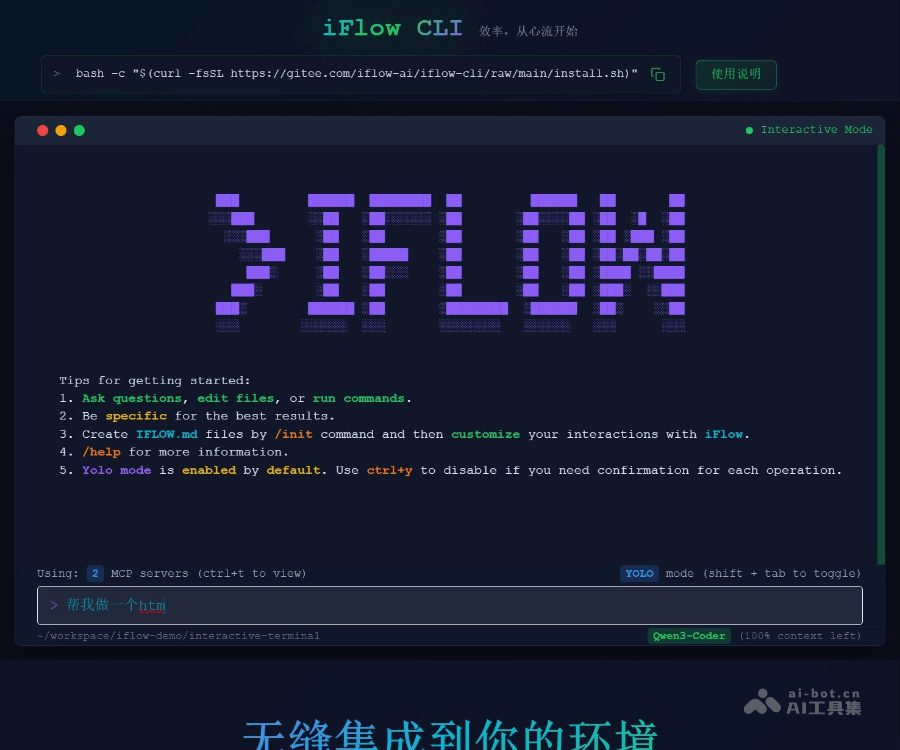
iFlow CLI is Ali Flow AI The free terminal AI agent launched by the team can be called the domestic version“ Claude Code ”. Support natural language interaction, users do not need to memorize complex commands, just give instructions in everyday language, and they can complete tasks. The iFlow CLI has strong multi-model support and is freely callable Qwen3 MAX , Kimi K2 etc. top-level model, with unlimited traffic. It has performed well in many performance evaluations, especially in terms of Chinese processing and localized experience. It supports searching for information at home and abroad, multi-modal understanding, etc. The iFlow CLI offers a wealth of extension features such as Agent SDK, Agent Market and Developer Forums to facilitate user customization and communication according to needs. Applicable to data collation and analysis, project development assistance, code review and other scenarios.

Main functions of iFlow CLI
-
Natural-language interactions : Supports giving instructions in natural language, no need to memorize complex commands, users can interact with it like communicating with people, and complete various tasks easily.
-
Multi-model support : Supports a variety of mainstream domestic big models, such as Qwen3 Coder, Kimi K2, DeepSeek V3.2, etc. Users can choose different models according to their needs.
-
Permanently free : Permanently free for individual users, no limit on the number of uses and traffic, users can use the latest cutting-edge models at zero cost.
-
Automated task execution : It can automatically analyze user needs and perform tasks, such as data analysis, code generation, file organization, etc., which greatly improves work efficiency.
-
Deep engineering capabilities : Provides in-depth engineering functions such as code review, project development assistance, workflow management, etc., and supports the automation of the entire process from code analysis to deployment.
-
Expansiveness : Support to extend functionality by installing sub-agents (SubAgents) and MCP tools, users can customize intelligent agents to their needs.
-
Localized experience : Tailor-made for domestic users, supports Chinese display switching, provides localized search capabilities, multi-modal understanding, etc., and is more in line with the usage habits of domestic users.
-
Cross-platform installation : Support macOS, Linux, Windows and other operating systems, users can easily install and use on different platforms.
-
Developer-friendly : Provide Agent SDK, support multiple programming languages, facilitate developers to integrate iFlow CLI into their own projects, and quickly become AI capable.
Advantages Highlights of iFlow CLI
-
Natural language tasks : It runs directly at the terminal in the form of a natural language command line, and the process is fully automated.
-
Permanently free : Users can call the latest cutting-edge models such as Qwen3 MAX, Kimi K2, DeepSeek V3.2, GLM4.6 at zero cost, and they can be used at any time without limit.
-
Model adaptation : The flow research team followed the mainstream domestic large models for adaptation. After the release of DeepSeekV3.2 and GLM4.6, iFlow CLI was quickly updated.
-
Searchability : Supports searching for the latest information at home and abroad, and has built-in multi-modal understanding ability to recognize pictures.
-
Localized experience : Tailored for domestic users, such as Chinese display switching, Spec development, agent market, developer forum, etc.
-
Agent SDK : Supports Android SDK, Node. js, Java, Python, allowing the business to quickly integrate CLI and have AI capabilities as quickly as possible.
Official website address of iFlow CLI
- Official Website Address :https://cli.iflow.cn/
- GitHub Warehouse :https://github.com/iflow-ai/iflow-cli/
- Open Platform for Flow :https://platform.iflow.cn/
How to use iFlow CLI
-
Install :Select the installation method according to the operating system. macOS/Linux users can use one-click installation scripts or npm installation commands; Windows users need to install Node.js first, and then run the npm installation command. Once installed, run
iflow --versionVerify successful installation. -
First Settings : Run
iflowStart CLI, select login. It is recommended to log in with “Login with iFlow” for a full functional experience; you can also choose “flow API Key” to log in or “OpenAI Compatible API” to log in. After successful login, select a large model. -
Run first task : Enter the project directory and run
/initAnalyze project structure and functions; or directly enter simple task instructions, such as “create a Python script to calculate the first 10 terms of the Fibonacci sequence”; you can also use Shell command assistance, such as“! ls -la”, and let iFlow CLI analyze the directory structure. -
Auto-update :iFlow CLI automatically detects and updates when started. If automatic update fails, it needs to be run manually
npm i -g @iflow-ai/iflow-cliUpdate; if the manual update also fails, uninstall and reinstall it. -
Cheat-a-check of common commands :
/helpView help;/initAnalyze project structure;/clearEmpty conversation history;/exitExit CLI;!命令Execute system commands. -
Troubleshooting : Encounter installation problem, check Node. js version and network connection; authentication problem, ensure that the API key is correct and the network is normal, and the key can be regenerated; use it when the command does not respond
Ctrl+CInterrupt operation, run/clearOr restart the CLI.
Tips for using iFlow CLI
-
File operations : Input
@Select File. -
Urgent interruption : Press Esc Shout “Stop” immediately.
-
Exit method : Double-click Ctrl+C , or just close the window.
-
Long text input : Press Ctrl+X Open Notepad, support multiple lines of input, automatically synchronize after saving.
-
Function quick check : Press the English input method
/, view all features.
Application scenarios for iFlow CLI
-
Project analysis : Runs under the code item directory
/init, iFlow CLI can analyze the structure and main functions of the project, helping developers quickly understand the project layout. -
Code generation and optimization : The user can instruct the iFlow CLI to create code for specific functions, such as “creating a Python script that calculates the first 10 terms of the Fibonacci sequence”, which can automatically generate code and optimize it.
-
Document manipulation and collation : Assisted by Shell commands, such as
!ls -la, iFlow CLI can analyze directory structures and provide suggestions to help users organize files. -
Data analysis and reporting : Users can upload data files and let iFlow CLI perform analysis and generate reports, such as “generating analysis reports based on data”.
-
Code review : after installing code review specialist Subagent, iFlow CLI can review the code and generate a review report that will help developers identify potential problems.
-
Task automation : Using the automation capabilities of iFlow CLI, users can set up task chains to automate the entire process from code analysis, development, testing to deployment.
-
Multimodal tasks : Supports multi-modal functions such as image understanding, users can upload pictures and have iFlow CLI analyze or generate descriptions.