
What UXbot is
UXbot is AI product design tools , can quickly transform ideas into complete visual designs and interactive prototypes. Users can quickly generate high-fidelity prototypes of multiple pages and complex interactive processes by simply entering simple requirements or ideas. UXbot supports Web, App, desktop and tablet designs, adapts to mainstream device resolutions, provides one-click switching of design styles (such as light objects, ground glass, dark mode) and real-time preview of interactive processes. UXbot does not require a code foundation and is suitable for product managers, designers and teams to efficiently complete the entire process of spiritual demo and help design creation.

Main functions of UXbot
- AI-generated design : Input ideas or needs, UXbot can generate complete visual designs and interactive prototypes at once, achieving efficient conversion from text to design drawings.
- Workflow visualization : Provide editable high-quality workflow, users can clearly control page descriptions, function definitions and inter-page relationships, and easily adjust and optimize.
- Multi-end Adaptation Design : Supports Web, App, desktop and tablet designs, automatically adapts to mainstream device resolutions, does not require repeated development, and meets multi-scenario needs.
- Switch styles with one click : Built-in multiple design styles (such as light objects, frosted glass, dark mode), users can switch at any time to quickly present different visual effects.
- Interactive flow preview : Supports real-time preview of the complete interaction process, intuitive demonstration of dynamic effects, and supports seamless export of control permissions to facilitate demonstration and delivery.
-
Multi-forked Workflow : Supports complex interaction logic. Pages can interact freely one-to-many. Users can freely drag and connect pages like building blocks, and sort out complex product logic.
-
Intelligent parsing reference diagram : Upload reference images (screenshots, photos, line drawings). AI can analyze and generate optimized designs, which is suitable for innovation based on existing designs.
-
Massive Template Library : Provide 20+ high-frequency business scenario templates and one-click reuse of mature solutions.
-
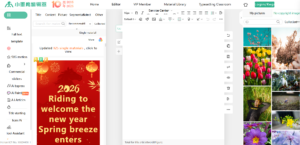
Refined Editor : Provides panoramic control, layer management, historical version traceability and other functions, and supports pixel-level design adjustments, including intelligent layout, precise size, text control, layer style, etc.
-
AI generation is taking a leap forward : Based on the innovative RAG + small model architecture, it significantly improves the generation speed of simple pages and significantly shortens waiting time.
-
Inter-empowerment : Supports configuring ID/title for elements, setting hyperlink jump addresses for pictures, and enhancing design interactivity.
-
One-click preview and export : Supports one-click preview of the complete dynamic interaction process, supports exporting Sketch project files and development-level HTML, and seamlessly connects the development process.

How to use UXbot
- Login and registration : Visit UXbot official website https://www.uxbot.cn/ to complete account login and registration.
- Select Design Patterns : After logging in, select “describe creation” to start from scratch, or select “picture creation” to create based on reference pictures.
- Description creation :
- Project Settings : Select the platform type (Web, App, Desktop, Tablet), set the resolution, and fill in the product description in detail.
- Set Product Style : Select the preset style template, or describe the desired style in text.
- Generate Workflow (Workflow) : Click “Generate Workflow” and the AI will generate a user flowchart based on the description.
- View with Edit Workflow : view the generated flowchart, edit nodes (modify, copy, delete, add children), adjust node positions.
- Generate product interface : Once satisfied with Workflow, click “Generate Product Interface” and the AI will generate a page design for each node.
- Browse & Edit Product Interface : Switch pages in the page list, use the right editing panel to adjust elements, and use AI to intelligently generate/modify functions to optimize design.
- Preview & Export : Preview interactive effects, AI generates pictures, exports to Sketch or HTML format for further editing or delivery.
- Image creation : Select “picture creation” mode, set the target platform and resolution, upload reference screenshots, enter design requirements, AI analysis to generate a new design, and the subsequent editing, preview, and export processes are similar to the text generation mode.
UXbot’s product pricing
- Buy weekly :
-
Personal edition : The price is ¥39/week and offers basic features, suitable for users who need to use or try the service for a short period of time.
-
Pro : The price is ¥209/week and offers complete professional features for professional users who need full functional support.
-
- Monthly purchases :
-
Personal edition : The price is ¥169/month, providing more AI-generated pages and export times, suitable for users who need monthly use.
-
Pro : The price is ¥899/month, providing unlimited number of AI generated pages and exports, suitable for users who need to use professional functions frequently.
-
- Quarterly purchases :
-
Personal edition : The price is ¥479/quarter, providing quarterly AI-generated pages and export times, suitable for users who need to use the service stably for a long time.
-
Pro : The price is ¥2499/quarter, providing unlimited number of AI generated pages and exports, suitable for users who need long-term and frequent use of professional functions.
-
UXbot application scenarios
- Web site design : Quickly generate responsive web page designs, adaptable to a variety of browsers and screen sizes, suitable for users who need to build websites efficiently.
- Mobile application (App) design : The tool supports native-level mobile application design, adapts to iOS and Android platforms, and meets mobile application development needs.
- Iterates quickly to collaborate with the team : The tool provides real-time preview and one-click export functions to facilitate team collaboration and rapid iterative design, improving project advancement efficiency.
- Creative Exploration & Proof of Concept : Quickly transform ideas into visual high-fidelity prototypes, support multi-forked Workflow, and help explore new ideas and verify product concepts.
- Intra-corporate tool design : Tools support complex function module design and efficient workflow editing, suitable for designing enterprise internal management systems and tools.